
Allentown - Morning Call
Tribune Publishing Inc.News & Magazines
3.1149.00 Reviews
- Version
- 10.0.60
- Installs
- 10.00K
- Age Rating
- Everyone
Screenshots
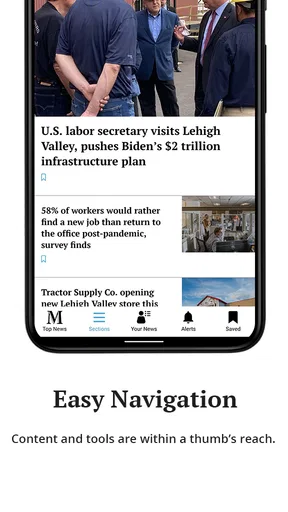
Our Review of Allentown - Morning Call
 Analysis by Appyee
I spent time with Allentown - Morning Call as a mobile news reader, and my impression is fairly specific: it is most useful when you want a direct connection to Allentown-area reporting rather than a broad national news feed. The app sits in the News & Magazines category and is published by Tribune Publishing Inc., so its purpose is clear from the start. It is built around local newspaper reading, not around being an all-purpose replacement for every news source on your phone.
That focus is both its main appeal and its biggest limitation. If local stories, community developments, regional politics, weather coverage, and nearby events are the reason you open a news app, a dedicated publication app can feel more organized than searching the web each morning. If you mainly want breaking national headlines, live television coverage, or a personalized stream assembled from many publishers, the usual news aggregators will probably suit you better.
How the current app feels in everyday use
The current release is version 10.0.60, and the store describes it as a re-imagined experience designed for different screen sizes. In practical terms, that matters because a newspaper app has to work in more than one situation: a quick glance on a phone, a longer read while commuting, or a wider layout on a tablet. I found the idea of a publication-specific reading space more comfortable than jumping between individual browser pages, especially when I wanted to stay within the Morning Call’s local coverage.
The app is free to install and has an Everyone content rating, which makes it easy to try without treating the download as a major commitment. It has been available since Jan 20, 2011, so this is not a newly launched experiment. Its long presence suggests an established product that has gone through several stages of development, while the current version shows that the interface is still being maintained rather than left untouched.
That history is worth keeping in mind. A long-running newspaper app often carries expectations from two different groups: new readers want a clean, modern mobile experience, while existing subscribers want familiar access to the publication they already follow. The best version of this kind of app has to balance both. In my use, the redesigned direction feels aimed at making the publication more adaptable across devices, but the experience still depends heavily on whether your reading habits match a local newspaper format.
The audience size also gives a useful sense of scale. The app has passed ten thousand installs, with an average rating of 3.1 from around three hundred ratings and roughly one hundred fifty written reviews. I would not treat that rating as a final verdict, because newspaper apps are often judged on several things at once: article quality, account access, subscription expectations, loading behavior, and the reader’s opinion of the publication itself. Still, it is a reminder to approach the app with realistic expectations rather than assuming every part of the experience will feel polished for every user.
What has changed in the modernized experience
The most important confirmed change is the move toward a re-imagined and remastered presentation for different screen sizes. That is more meaningful than a simple color refresh. A newspaper reader has to make headlines, images, article text, and navigation work together without making the page feel cramped. On a phone, the priority is quick scanning and comfortable reading. On a larger display, the same content should make better use of available space instead of appearing like an enlarged phone screen.
I see this evolution as a shift from treating the app as a digital copy of a newspaper toward treating it as a mobile reading product in its own right. That does not mean it becomes a social feed or a general-purpose aggregator. The publication remains the center of the experience. The improvement is in how that material is presented to someone who may check a headline for a minute, return later for a longer article, and move between devices during the day.
For existing users, the change can be helpful but may require a short adjustment period. People who have used an older layout for years often know exactly where to tap without thinking. A redesigned interface can make the app look cleaner while temporarily slowing those familiar routines. My advice is to spend a few minutes exploring the main reading areas after updating instead of judging the new layout during the first rushed morning check.
There is also a subtle trade-off in a redesigned publication app: visual improvement does not automatically mean editorial improvement. A cleaner presentation can make articles easier to follow, but it does not change the depth, speed, or local relevance of the reporting itself. I would choose this app because I want Morning Call coverage in a dedicated place, not simply because the interface has been refreshed.
A realistic morning routine with the app
Imagine starting the day with ten minutes before work. You want to know what is happening around Allentown, but you do not want to sort through a national feed that buries local stories under celebrity updates and distant political arguments. This is where the app makes sense. I would open it, scan the available headlines, choose one or two stories that affect the local area, and leave the rest for later rather than trying to consume everything in one sitting.
That workflow is different from using a search engine. Search is excellent when you already know the subject, but it tends to scatter coverage across many sites and can make it difficult to tell which stories belong to the same local news context. A newspaper app gives you a publication-centered starting point. The trade-off is that you are accepting the publication’s editorial priorities instead of building a feed from multiple outlets.
For a resident, that focus can save time. For someone who has moved away from the area but still wants a connection with local news, it can also be more useful than a general city-news search. I would especially consider it for readers who prefer following one publication consistently rather than checking several social accounts and browser tabs.
On the other hand, I would not use it as my only source during a fast-moving national event. A local newspaper app may provide valuable regional context, but a dedicated wire service, live-news app, or public broadcaster is usually better when the goal is minute-by-minute national or international coverage. The choice depends on whether you value local depth or broad immediacy at that moment.
Where it fits beside common alternatives
Compared with a general news aggregator, Allentown - Morning Call offers a narrower but more coherent reading experience. Aggregators are convenient when you want many viewpoints in one stream, and they are often better at discovering topics outside your usual interests. Their weakness is that local reporting can become just another item in a crowded list. This app gives local coverage a clearer home.
Compared with reading the Morning Call through a mobile browser, a dedicated app can feel more natural for repeated use. You are opening a publication-specific tool instead of navigating through bookmarks or search results each time. The advantage is greatest for readers who check the same local source regularly. If you only visit occasionally, the browser may be enough and avoids adding another app to your device.
Compared with social media, the app is a better choice when you want to read an article rather than react to a headline. Social platforms are faster for discovering what people are discussing, but they also mix reporting with commentary, reposts, and incomplete context. A newspaper reader is less chaotic. The downside is that it may feel less lively to someone who expects comments, instant reactions, or a constantly changing personalized timeline.
Compared with a national newspaper app, this one wins on geographic relevance for Allentown readers but loses on breadth. I would not install it expecting a complete replacement for a national publication. I would add it when local coverage is important enough to deserve its own place on my phone.
Costs, access, and the decision to keep it installed
The download itself is free, but the app includes in-app purchases ranging from $4.99 to $199.99 per item. That wide range tells me that the financial question is not simply whether the app costs anything to install. A reader should pay attention to the purchase screen and understand what an offered item provides before confirming it. Free installation is useful for trying the reading experience, but it should not be confused with unlimited access to every possible part of a newspaper service.
This is one of the areas where I would be especially careful if I were recommending the app to a friend. I would suggest installing it first, checking how the current reading experience fits your routine, and only then considering a purchase. Think about how often you actually read local coverage. Someone who opens the app several times each week may see more value in a paid option than someone who only wants an occasional headline.
The app requires Android 8.0 or later, so compatibility should be straightforward for many current devices, while owners of older phones should check their operating system before planning around it. The Everyone rating also makes it suitable for a broad household audience, although individual readers will still decide whether the publication’s subject matter and tone match their preferences.
I would keep it installed if I lived in or near Allentown, followed the Morning Call regularly, and preferred a dedicated reading environment. I would skip it if my news needs were mainly international, if I wanted several publishers combined automatically, or if I rarely read local articles. In those cases, a browser bookmark or a broader news reader would likely be more efficient.
Small habits that make the experience more useful
My first practical tip is to use the app as a deliberate local-news check rather than leaving it open as background noise. Decide what you want from the session: a quick headline scan, one substantial article, or a look at a particular community topic. That approach helps a focused publication app feel purposeful instead of making its narrower scope seem like a weakness.
Second, compare the app with your existing news routine for several days before deciding whether it deserves a permanent place on your home screen. The real test is not whether the first launch looks modern. It is whether the publication’s local coverage consistently answers questions you actually have. A redesigned layout can improve access, but usefulness still comes from the match between the reporting and your life.
Third, use the larger-screen design to change how you read, not just where you read. On a tablet or other spacious display, a longer article may be easier to assess before committing time to it. On a phone, a quick scan can help you save your attention for the stories that matter most. The point of supporting different screen sizes is not merely visual comfort; it gives you more than one sensible reading rhythm.
Finally, separate the value of the app from the value of any purchase prompt. If you are unsure about spending money, keep using the free portion in a normal routine and note whether it replaces another news habit. That is a more reliable decision than reacting to a single interesting headline. The best reason to pay is repeated local usefulness, not curiosity at the moment of installation.
What still feels unresolved
The modest average rating means I would not describe the current release as universally smooth. I did not read that score as proof that the app is poor, but I did take it as a reason to leave room for friction. Newspaper apps can be affected by account flows, changing access rules, device differences, and expectations shaped by earlier versions. A reader who wants a completely frictionless, highly personalized news feed may find this product less satisfying than a larger platform built around aggregation.
There is also an inherent limitation in depending on one publication. A single local source can offer a strong sense of place, but it cannot provide every perspective or every kind of coverage. I would use the app alongside another source when a story has serious consequences or when I want to compare reporting. That is not a criticism unique to this application; it is the normal trade-off of choosing a focused publication over a multi-source service.
Another gap is the tension between a modern interface and the expectations of today’s mobile readers. People now expect instant loading, easy discovery, flexible alerts, seamless account handling, and a layout that adapts perfectly to every device. The app’s current redesign points in the right direction for screen flexibility, but a visual refresh alone cannot guarantee that every part of a reader’s routine will feel equally refined. I would judge it by repeated use rather than by the first impression.
For longtime users, the main question is whether the new presentation makes familiar reading faster or merely different. For new users, the question is whether the Morning Call’s local focus is strong enough to justify a dedicated installation. Those are separate decisions, and the same version can be a welcome update for one reader while feeling unnecessary to another.
What I would watch going forward
I would watch how the app continues to handle different screen sizes, because that is the clearest direction in its current evolution. A redesign is most valuable when it remains practical as devices change, not just when it looks fresh at launch. I would also pay attention to whether the app keeps the path from headline to article simple for both returning readers and people discovering the publication for the first time.
I would also watch the balance between free access and in-app purchases. Clear explanations at the point of purchase would matter to me, especially with options spanning from a small one-time amount to a much larger item. Readers should be able to understand what they are choosing and whether it fits their reading habits before committing.
Most importantly, I would watch whether the app continues to feel like a useful local companion rather than a generic container for articles. Its identity is strongest when it helps people follow Allentown and the surrounding area with less effort. If that local purpose remains clear while the reading experience keeps improving, the app has a sensible role on Android devices running version 8.0 or newer.
My final view is positive but selective. I would recommend Allentown - Morning Call to someone who wants dedicated local news and is willing to judge it on that purpose. The free installation makes trying it easy, and the current version’s device-focused redesign is a meaningful step for a publication app with a long history. I would not recommend it as a universal news solution, and I would approach purchases carefully. For the right reader, though, it can turn local reporting from something you search for occasionally into something you can check as part of a simple daily routine.
Verdict
Strengths of Allentown - Morning Call
- Covers local Allentown and Lehigh Valley news in one place.
- Offers timely updates on breaking stories and community events.
- Includes sports coverage for regional teams and schools.
- Digital articles are convenient to read on phones and tablets.
- Helps readers follow local issues often missed by national outlets.
Limitations of Allentown - Morning Call
- Some content may require a subscription or account to access.
- Advertising can interrupt reading and affect the browsing experience.
- The app may send frequent notifications unless they are customized.
- Coverage is highly regional and may feel limited outside the Lehigh Valley.
- Loading times can vary with weak connections or older devices.
Other Releases by Tribune Publishing Inc.
View All
New York Daily News
News & Magazines3.3

Chicago Tribune
News & Magazines2.6

Hartford Courant
News & Magazines2.6

Sun Sentinel
News & Magazines2.8
Similar Picks in This Category
View All
Google News - Daily Headlines
Google LLC4.0

X
X Corp.4.8

Flipboard:Your Social Magazine
Flipboard3.4

Opera News: breaking & local
Opera4.5

Hindi News by Dainik Bhaskar
Dainik Bhaskar Group4.0

Way2News Daily News App
Way2News ( Formerly Way2SMS )4.6
Frequently Asked Questions
What is Allentown - Morning Call?
Allentown - Morning Call is a news app focused on local reporting from Allentown and the surrounding Lehigh Valley area. It typically provides access to breaking news, community updates, politics, sports, entertainment, business coverage, weather information, and opinion articles from The Morning Call. The app is designed for readers who want regional news in a convenient mobile format rather than relying only on a web browser.
Is the Allentown - Morning Call app free to download and use?
The app can generally be downloaded free of charge, but access to all articles and premium features may require a subscription or an active digital membership. Some stories may be available without signing in, while other content can be limited by a paywall. Before subscribing, users should review the current pricing, trial terms, renewal conditions, and whether their existing Morning Call subscription includes mobile access.
What kind of news and features are available in the app?
The application is intended to bring together the main sections of The Morning Call in one place. Depending on the current version, users may find local and national headlines, sports scores and coverage, weather updates, business news, entertainment, investigative reporting, newsletters, saved articles, and breaking-news notifications. The exact selection can change over time, so available features may vary by device, region, account type, and app update.
Does Allentown - Morning Call require an account or subscription?
You may be able to browse selected headlines and articles without creating an account, but an account is commonly needed to unlock subscriber content, manage preferences, save stories, or synchronize access across devices. A paid subscription may also be required for unlimited reading. Users should check the sign-in and subscription screen carefully, especially if they already subscribe through the newspaper website, because access instructions and benefits can differ.
Is the app worth downloading for local Allentown news?
For readers who live in Allentown, the Lehigh Valley, or nearby Pennsylvania communities, the app can be a practical way to follow local developments without repeatedly searching the website. Its main advantage is convenient access to regional reporting and timely alerts. However, users who only want occasional headlines may find subscription limits restrictive, while those seeking broad national coverage may prefer a larger general-news app alongside it.
